Access Tokens Forge
Flowie on Forge manages your repositories’ webhooks with workspace tokens or, without Bitbucket Premium, a workspace admin’s Bitbucket authorization (see below). Configurations of every level need one of them.
- Bitbucket Premium: add workspace tokens. Bitbucket limits API requests per token, so Flowie needs one workspace token for every 50 repositories in the workspace, and at least three, so one being revoked or expiring doesn’t stop the webhooks. We recommend at least five workspace tokens.
- Without Premium: authorize Flowie in Bitbucket. The authorization carries the webhooks of up to 200 repositories.
Larger workspaces also need repository tokens for the repositories beyond that: each takes its repository off the limits above. Repository tokens never replace workspace tokens or the authorization. The browser extension creates them in bulk. Flowie’s Access tokens page shows what is still needed, based on your Bitbucket plan and workspace size.
Bitbucket authorization (without Premium)
Without Bitbucket Premium, a workspace admin selects Authorize Flowie in Bitbucket on Flowie’s Access tokens page. Flowie then manages the webhooks of repositories without their own repository token, which enables configurations of every level. If the authorization stops working, for example because its admin leaves the workspace, existing configurations keep working, but configurations cannot be edited until a workspace admin authorizes Flowie again.
Automatic setupRECOMMENDED
With the Flowie browser extension installed, select Auto setup tokens on Flowie’s Access tokens or Configuration page and follow the instructions on the page.
Flowie automatically creates the appropriate tokens with the required scopes and saves them for you. Workspace tokens can be created in bulk, making setup faster and reducing mistakes without manually copying and pasting each token.
Manual setup
If you prefer to set up tokens manually, follow the steps below.
- Create a workspace token in Bitbucket, selecting the scopes below and an expiry that meets your workspace policy.
- Copy the token when Bitbucket displays it; it is shown only once.
- Paste it under Workspace settings > Flowie > Access tokens > Workspace tokens and select Add token.
Repository tokens are created by the browser extension.
Required scopes
For workspace tokens, select the scopes shown below:
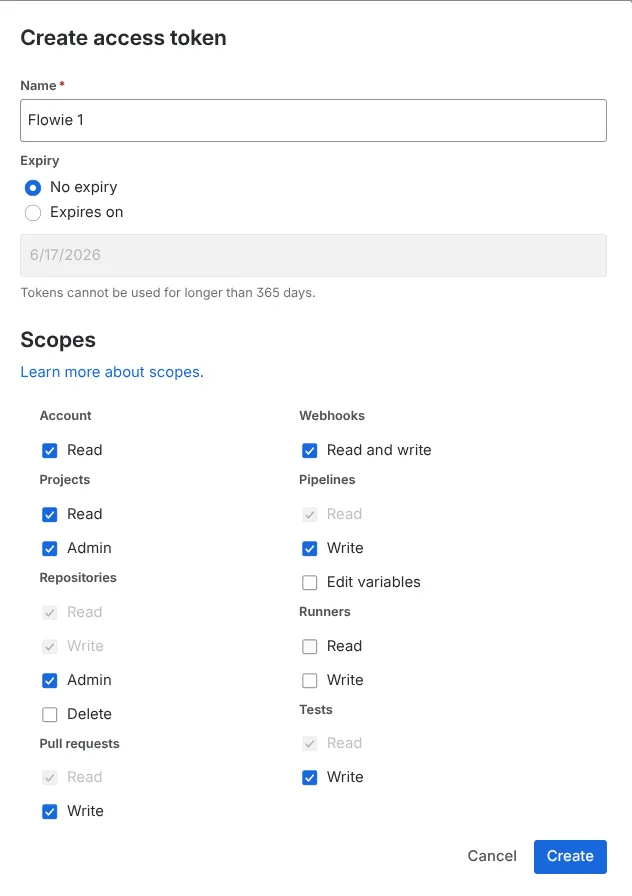
For repository tokens, select Repositories: Admin, Pull requests: Write, Webhooks: Read and write, and Pipelines: Edit variables. Keep any read permissions Bitbucket selects automatically.